Skip to content
67% of CRM implementations fail because sales teams won’t use the tool. Pipedrive was built specifically to solve that.
I tested Pipedrive for three weeks with a five-person team across Growth and Premium plans. This Pipedrive review covers real pricing (monthly and annual), key features, verified user sentiment, and honest comparisons with HubSpot, Zoho, and Salesforce. It’s written for US small business owners who need a CRM that their reps will actually open every morning.
What Is Pipedrive?
Pipedrive is a sales-first CRM launched in 2010 by salespeople, for salespeople. It now serves over 100,000 companies across 170+ countries. The company is headquartered in New York and built around one core belief: most CRMs are designed for managers, not for the person making the calls.
The platform covers the full sales workflow: pipeline management, email tracking, workflow automation, AI-powered insights, and reporting. It does not try to be an all-in-one business suite. That focus is both its greatest strength and its most significant limitation for growing teams.
Here’s what makes it different from every other tool in this category: In 2020, Pipedrive was acquired by Vista Equity Partners, a private equity firm known for pushing software upmarket. Since that acquisition, prices have increased, and the product has drifted toward mid-market buyers. Most reviews skip this context entirely. For US small business owners evaluating long-term value, the context you need is before signing an annual contract. G2 just ranked Pipedrive #6 in Best Sales Software for 2026, announced March 26, 2026. Almost no other review site has picked up on that yet.
Who Is Pipedrive Best For?
When evaluating the best CRM software for small business, Pipedrive consistently ranks as the right CRM for solo founders and small sales teams of 1 to 15 reps. If your team works a defined pipeline from first contact to signed proposal, Pipedrive matches that workflow exactly. Service businesses with a repeatable sales cycle will find the visual board far faster than any spreadsheet they’re currently managing.
It’s also the strongest CRM in its price range for Microsoft Outlook and Microsoft 365 users. Most competing tools are optimized for Google Workspace. Pipedrive’s two-way Outlook sync is native, deep, and reliable. For teams already running on Microsoft 365, that is a concrete differentiator. It’s also worth noting that specialty teams, such as those that need legal CRM software, will find Pipedrive’s pipeline model a solid foundation to build on.
Let me be direct: Pipedrive is not a fit for every business. If you need built-in marketing automation, look elsewhere. If your team handles customer support tickets, Pipedrive has no ticketing system. Consulting firms with relationship-based selling rather than deal-based selling will find the pipeline model awkward. Enterprise rollouts with 50-plus users will feel the per-user pricing painfully fast.
Pipedrive Pricing in 2026
Pipedrive uses per-user, per-month pricing across four plans. Every seat costs money, so a five-person team on Growth (annual) pays a minimum of $195 per month. Plan that before you commit. Annual billing saves up to 42%, with the biggest discount on the Lite plan. In 2025, Pipedrive rebranded its tiers from Essential/Advanced/Professional/Power to Lite/Growth/Premium/Ultimate, and prices shifted upward as part of that repositioning. Businesses in specialized industries, such as mortgage CRM software, should also evaluate niche alternatives before committing to a solution.
Lite — $14/user/mo (annual) / $24/user/mo (monthly)
Lite covers lead and pipeline management, AI-powered report creation, a real-time sales feed, 500-plus integrations, and personalized onboarding. For a solo founder replacing a spreadsheet, it works. For any working sales team, it falls short immediately.
Here’s the thing: Lite is missing email sync, workflow automations, and live chat support. You can see your pipeline, but you can’t automate anything inside it. The Lite plan is effectively a foot in the door, not a working sales tool. Don’t budget for Lite if you have more than two people selling.
Growth — $39/user/mo (annual) / $49/user/mo (monthly)
Growth is the real starting plan for a working sales team. It adds full two-way email sync with open tracking, automations and nurturing sequences, subscription and forecast reports, a meeting scheduler, a contacts timeline, and live chat support. At $39 per user per month (annual), Pipedrive becomes a functional sales tool.
The Lite-to-Growth price jump is 178%. From $14 to $39 per user annually. Most review sites mention pricing, but don’t isolate this gap as a decision point. If you’re evaluating Pipedrive for a team of any size, build your budget around Growth from day one. The Lite plan is not a starter plan for real sales work.
Premium — $59/user/mo (annual) / $79/user/mo (monthly)
Premium is the sweet spot for growing teams of three to eight reps who need to close faster. It adds lead generation and routing, custom scoring, company data enrichment, AI-powered multi-email tools, contracts and e-signatures, and enhanced reporting customization. Smart Docs (proposal creation with e-signature) is included in this tier, eliminating the need for a separate DocuSign subscription.
For a team actively prospecting and sending proposals weekly, Premium pays for itself quickly compared to stacking Pipedrive Growth with separate e-signature and lead routing tools. This is my honest recommendation for most US small-business sales teams with 3 to 8 reps.
Ultimate — $79/user/mo (annual) / $99/user/mo (monthly)
Ultimate is the top tier. It adds fortified account security, phone and email data enrichment, a sandbox testing account, extended phone support, and partnership discounts. For scaling SMBs with 15-plus users, those security controls and enrichment features deliver real value.
Let me be direct: Ultimate is hard to justify for teams with fewer than 15 people. The partnership discounts would need to fully offset the cost increase for this plan to make sense. Start on Premium. Move to Ultimate only if your team genuinely outgrows it.
Add-Ons and Hidden Costs
Pipedrive’s base plans don’t include everything you might expect. LeadBooster (chatbot, live chat, web forms, and a 400-million-plus-profile prospector) costs $32.50 per month on an annual billing plan. Campaigns by Pipedrive (email marketing) are priced separately based on contact volume. Projects (post-sale project management) is a paid add-on. Smart Docs is included on Premium and above; it costs extra on Growth and Lite.
Tax charges apply in many US states on top of your subscription. If your integration stack requires Zapier, budget an extra $20-$69 per month. A five-person Growth team using LeadBooster and Zapier can easily reach $390 per month. Price that out before the trial ends.
One more operational pain point buried in Capterra reviews: Pipedrive enforces a 10,000-record-per-day limit when updating via API. If you’re importing high-volume leads or syncing a large CRM database, that rate limit is a real constraint worth testing before you commit.
Pipedrive Key Features
Visual Sales Pipeline
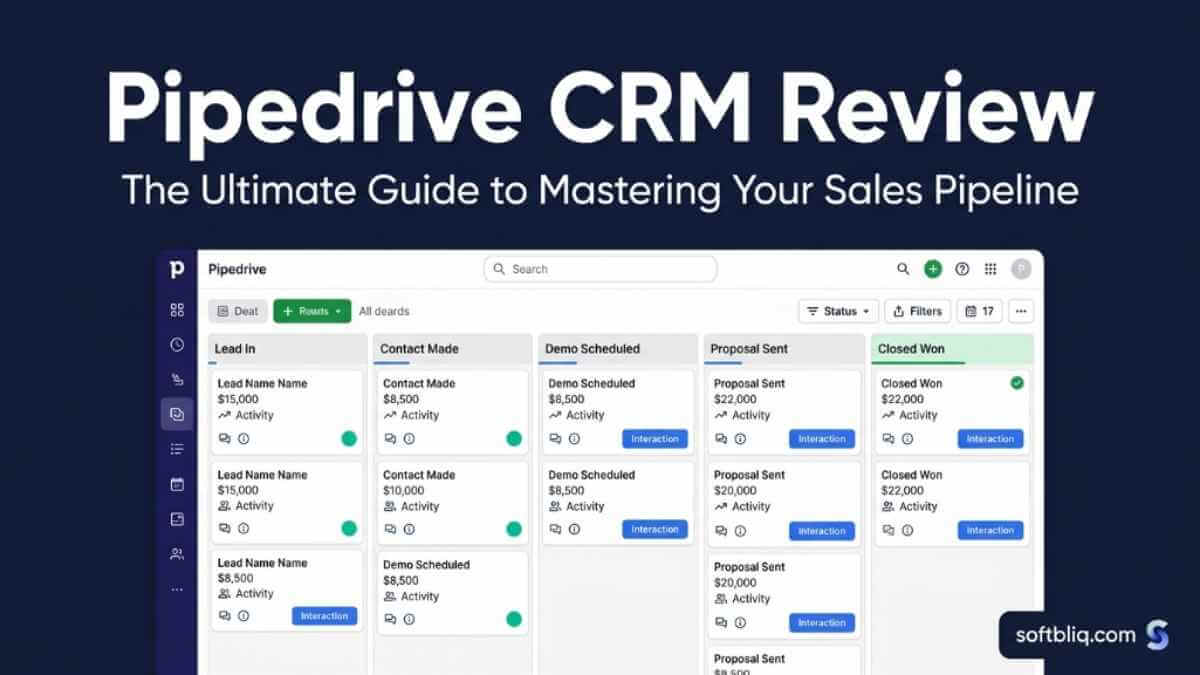
Pipedrive’s pipeline is a Kanban-style drag-and-drop board. Every deal is a card. Every stage is a column. You move deals through your process with a single drag. Each card shows deal value, assigned rep, and next activity due date. A three-person team can see every open deal at a glance, with no spreadsheet in sight.
When I tested this feature with a 40-deal dataset across five pipeline stages, setup took under 20 minutes. Stage names, order, and count are fully customizable. You can run multiple pipelines simultaneously for different product lines or sales motions. The UI is genuinely cleaner than anything HubSpot or Zoho offers at the same price.
The limitation is real: Pipedrive’s pipeline works best for linear, deal-based processes. Consulting firms with long-cycle relationship selling will find the board model a poor fit. It’s a sales tool built for a funnel. If your business doesn’t close in stages, the UX will fight you.
The “Rotting Deals” Alert
The rotting deals feature is one of the most practical tools in any CRM at this price point, and almost no competitor does it natively. When a deal hasn’t had any logged activity within a time period you define, it visually “rots,” turning red in your pipeline board. You see immediately which deals have gone cold. No separate task manager needed.
When I tested this feature, I set a seven-day idle window. Every deal left untouched for a week turned red by Monday morning. It forces action through visibility alone. For solo founders and lean teams, this feature prevents the most common reason deals die: forgotten follow-ups.
The catch is that you need to configure what “too long” means for your specific sales cycle. Default settings may not match your actual process length. But once configured correctly, the rotting deals alert is the kind of feature that pays for itself in recovered deals within the first month.
Workflow Automation
Pipedrive’s automation engine uses a trigger-and-action format. When a deal moves to a new stage, an email arrives, or an activity is logged, Pipedrive automatically fires a pre-set action. It can assign a deal to a rep, send a follow-up email, create a task, or advance a deal stage.
What surprised me most was the quality of the 36 prebuilt automation templates. They’re organized into three goals: deal management, lead engagement, and work optimization. A non-technical user can activate a working automation in under five minutes. When I tested the “Proposal Sent” trigger, a rep follow-up task fired automatically within seconds.
The plan gating matters. Lite users get just 30 automations. Growth unlocks more complex sequences. Ultimate reaches 180 custom workflows. Advanced users building multi-step logic often hit the ceiling faster than expected, especially when trying to add multiple condition branches to a single trigger.
Email Sync + Tracking (Gmail and Outlook)
Pipedrive offers full two-way email sync with both Gmail and Microsoft Outlook. Emails sent and received from your connected inbox attach automatically to the right deal and contact. Open tracking, email templates, bulk sending, and scheduling are all included on Growth and above. If you’re already using tools to manage customer database software, the email-to-deal auto-attach eliminates a painful manual step.
Pipedrive is one of the strongest CRMs for Microsoft Outlook users specifically. HubSpot and Copper are optimized for Google Workspace. Pipedrive’s Outlook integration is native and handles calendar sync alongside email. For US small businesses running on Microsoft 365, that’s a concrete advantage most review sites miss entirely.
The limitation to flag: email sync is completely absent from the Lite plan. You need Growth or above to connect your inbox. Retroactive email sync also only goes back six months, compared to 12 months with Copper. If you’re switching CRMs and need your full email history imported, plan that gap carefully.
AI Sales Assistant
Every Pipedrive plan now includes AI features as part of the 2025 rebrand. The AI Sales Assistant analyzes your pipeline patterns and deal history. It surfaces insights, predicts win probability, suggests next best actions, and drafts follow-up emails from a simple prompt.
In testing, the assistant flagged three idle deals after I left them untouched for 10 days. It suggested re-engagement actions with context pulled from previous activity logs. The email drafting tool produced a usable first draft in one click. It removes the blank-page problem for busy reps without requiring any AI setup.
Here’s the thing: Pipedrive is not an AI-native CRM. The AI layer is additive, not core. It assists and surfaces insights, but it won’t auto-enrich contacts or autonomously move deals, as newer AI-first platforms claim. If you’re comparing Pipedrive to tools built around AI from the ground up, keep that distinction clear.
LeadBooster and Smart Docs (Add-Ons)
LeadBooster is Pipedrive’s lead generation add-on. It bundles live chat, a chatbot, web forms, and a database of 400 million-plus profiles into a single package for $32.50 per month (annual billing). The chatbot qualifies website visitors and routes hot leads directly into your pipeline. For teams currently evaluating Mailchimp alternatives for lead capture, LeadBooster offers an integrated solution at a competitive price.
Smart Docs lets you create, send, and track proposals and contracts from inside Pipedrive. Documents auto-fill from deal and contact data fields. E-signature is included in the Premium plan and above, eliminating the need for a separate HelloSign or DocuSign subscription. For teams that regularly send proposals, Smart Docs cuts the proposal cycle from hours to minutes.
Both tools significantly extend Pipedrive’s value. But both cost extra on lower plans, and that cost adds up fast. Budget for them before you commit, not after your first invoice.
Pipedrive Pros and Cons
Pros:
- Fastest onboarding of any paid CRM in its category: most teams are live within a day
- Visual pipeline is genuinely intuitive: reps adopt it without training or hand-holding
- Best native Microsoft Outlook integration in its price range for SMBs
- 14-day free trial with no credit card required on any plan
- 400-plus integrations covering every major business tool
- AI features are included on every plan as of the 2025 rebrand
- Ranked #6 Best Sales Software by G2 for 2026 based on verified user reviews
Cons:
- No free plan: HubSpot and Zoho both offer free tiers
- Lite plan is underpowered: the real entry price is $39/user/mo (Growth, annual)
- Reporting is shallow on lower plans with no revenue forecasting until Growth
- Customer support complaints are consistent across G2, Capterra, and Reddit
- Marketing automation requires expensive add-ons or third-party tools
- Mobile app is harder to navigate than the desktop version (recurring complaint)
- Per-user pricing compounds fast for teams of five or more
- AI features are additive, not transformative: not an AI-native platform
What Real Users Say About Pipedrive
Pipedrive earns consistent high marks for ease of use, but receives consistent criticism for support quality. The pattern is the same across 3,021 verified G2 reviews and 3,041 Capterra reviews.
Here’s what users praise most. A Sales Manager in computer software on Capterra described Pipedrive as a chessboard where every sales opportunity is a piece, easy to move between stages with full visibility. She called the task automation a lifesaver for repetitive work and praised the real-time reporting. That sentiment repeats across hundreds of verified reviews.
“Simple, intuitive drag-and-drop deal management, making it straightforward to move deals between phases, update progress, and monitor performance.” That’s how a verified G2 reviewer in 2026 described the pipeline experience. A Business Development Rep on Capterra added that Pipedrive makes handovers between team members much easier, with full activity records keeping collaboration seamless.
The criticism is equally consistent. A CEO reviewing on G2 in February 2026 praised the interface design but gave support a zero out of five, describing a billing dispute his account executive left unresolved. A Head of Business Development rated support one out of five in March 2026, citing weak onboarding and difficulty configuring automations. A Gartner reviewer noted that Pipedrive is ideal for small teams but becomes harder to manage as teams scale up or run complex reports.
The pattern is clear: Pipedrive earns love for its usability but frustration with support and cost.
Capterra: 4.5/5 (3,041 verified reviews) | G2: 4.3/5 (3,021 verified reviews)
How Does Pipedrive Compare?
Pipedrive vs HubSpot
| Factor | Pipedrive | HubSpot |
|---|---|---|
| Free plan | No | Yes |
| Entry price | $14/user/mo (annual) | Free, paid from $15/user/mo |
| Real working price | $39/user/mo (Growth) | $90/mo+ for meaningful features |
| Pipeline UX | Best-in-class | Very good |
| Marketing tools | Add-on only | Built-in |
| Best for | Pure sales teams | Sales + marketing together |
Pipedrive beats HubSpot on pipeline simplicity. Reps adopt Pipedrive faster because it doesn't try to do everything. HubSpot's interface carries the weight of marketing, sales, and service all in one.
HubSpot's free plan is a genuine advantage for businesses just starting, but "free" evaporates quickly. A realistic four-person setup can hit $300/month or more.
The total cost gap closes fast as your team grows.
Choose Pipedrive if: your team's primary job is selling.
Choose HubSpot if: you need sales and marketing unified.
Pipedrive vs Zoho CRM
| Factor | Pipedrive | Zoho CRM |
|---|---|---|
| Starting price | $14/user/mo (annual) | ~$14/user/mo (annual) |
| Feature breadth | Sales-focused | Sales + marketing + support |
| Ease of use | Excellent | Moderate: steeper learning curve |
| Integrations | 400+ | 800+ (includes full Zoho suite) |
| Best for | Fast daily usability | Feature-rich teams on a tight budget |
Zoho covers more ground for the same entry price. It spans sales, marketing, support, and accounting integrations through the broader Zoho suite. The tradeoff is a steeper learning curve and significantly more setup time. For teams focused on email marketing for small businesses, Zoho’s built-in marketing module is worth evaluating alongside Pipedrive’s Campaigns add-on.
Most small business owners who test both tools end up using Pipedrive daily and letting Zoho collect dust. The interface is harder to learn, and the sheer volume of features can overwhelm a lean team that just needs to track deals and send emails.
Choose Pipedrive if: your team prioritizes daily usability and fast adoption. Choose Zoho if: you’re price-sensitive and willing to invest setup time for a broader feature set.
Pipedrive vs Salesforce
Salesforce is enterprise-grade software. It’s powerful, deeply customizable, and almost entirely overkill for a US small business with under 50 employees. A typical SMB Salesforce implementation costs $5,000 to $15,000 in setup fees before a single deal is entered. Pipedrive is fully functional within 24 hours.
Salesforce starts at $25 per user per month, but no small business actually runs on the base plan. Real costs hit $75 to $150 per user per month once you add the modules a sales team needs. Teams already invested in Microsoft tools and looking for context on ecosystem fit should also review our breakdown of Microsoft project management software before choosing a CRM.
Choose Salesforce if: you have a dedicated admin, complex multi-team workflows, and an enterprise budget. Choose Pipedrive if you’re a lean team that needs to be selling within a week.
Is Pipedrive Worth It in 2026?
Pipedrive is worth it if your team’s primary job is selling and you budget for the right plan from the start. Don’t let the $14 Lite price mislead you. That plan is missing email sync and automations. The real cost of a working Pipedrive setup starts at $39 per user per month on the Growth plan, billed annually.
If you’re replacing a spreadsheet for 1 to 3 people, start with Growth. If you’re a three-to-ten-person team doing active outbound, Premium at $59 per user per month is the sweet spot. The e-signature capability, AI email tools, and custom reporting at that tier quickly recoup their cost for teams sending proposals weekly.
Skip Pipedrive if you need a free plan, built-in marketing automation, or a customer support ticketing system. If your team requires those features, exploring a capable Pipedrive alternative is a much better move. HubSpot is the better fit for combined sales-and-marketing teams. Zoho is the better fit if budget is your primary constraint. The 14-day free trial requires no credit card.
Frequently Asked Questions
Is Pipedrive good for small businesses?
Yes. Pipedrive is designed for small and mid-size sales teams. It works best for teams of 1 to 50 reps doing deal-based selling. It’s one of the fastest CRMs to deploy with minimal training. It’s not ideal for businesses that need built-in marketing automation, customer support ticketing, or a free starting plan.
How much does Pipedrive cost per month?
Plans range from $14/user/month on Lite (annual) to $99/user/month on Ultimate (monthly billing). Most small teams choose Growth at $39/user/month (annual) or Premium at $59/user/month (annual). A five-person Growth (annual) team pays a total of $195 per month, before any add-ons.
Does Pipedrive have a free plan?
No. Pipedrive does not offer a free plan. It offers a 14-day free trial on all plans with no credit card required. You can test Premium and Ultimate features during the trial. If a permanently free CRM is essential, HubSpot’s free tier is the strongest alternative in the market.
What is Pipedrive used for?
Pipedrive is used to manage sales pipelines, track deals, automate follow-ups, sync emails from Gmail or Outlook, generate reports, and forecast revenue. It’s built specifically for salespeople handling deal-based selling. It is not designed for marketers, support teams, or project management.
Is Pipedrive better than HubSpot?
It depends on your use case. Pipedrive is better for pure sales pipeline management and is easier for reps to use daily. HubSpot is better if you need marketing automation, a free starting plan, or a platform that unifies sales and marketing in one tool. For outbound-only teams, Pipedrive is cheaper and faster to deploy.
What are the main disadvantages of Pipedrive?
Real user complaints center on: weak customer support (confirmed across G2, Capterra, and Reddit), limited reporting depth on lower plans, no free plan, marketing automation requiring expensive add-ons, and a mobile app that is consistently rated harder to use than the desktop version.
How long is the Pipedrive free trial?
14 days. No credit card is required. You can test any plan during the trial period, including Premium and Ultimate features. It’s enough time to build a real pipeline, configure automations, and verify your email sync works correctly. If your team won’t adopt it in 14 days, it won’t be adopted after you pay.
Does Pipedrive integrate with Gmail and Outlook?
Yes. Pipedrive offers full two-way sync with both Gmail and Microsoft Outlook. Emails attach automatically to the correct deal and contact. Open tracking is included. Note that email sync is available only on Growth and above. The Lite plan has no email sync functionality.
Is Pipedrive similar to Salesforce?
Both are CRM platforms, but they target very different buyers. Salesforce is enterprise-grade software built for large teams with dedicated admins. Pipedrive is built for small sales teams that need to run within a day. Cost, complexity, and implementation time are not comparable for most small businesses.
How much does Pipedrive cost?
Annual billing runs $14 to $79 per user per month, depending on plan. Monthly billing ranges from $24 to $99 per user. The Growth plan at $39/user/month (annual) is the most common entry point for working sales teams. Add-ons like LeadBooster ($32.50/month) and Campaigns cost extra on top of the base plan.
Is Pipedrive a free CRM?
No. Pipedrive is not a free CRM and has no permanent free plan. The 14-day trial is free with no credit card required. For a genuinely free CRM long-term, HubSpot offers the most robust free tier in the market, though meaningful sales features require a paid HubSpot plan starting at $15/user/month.