I spent 90 days testing Zoho CRM across four real business scenarios: a freelancer, a 7-person startup, a 12-person agency, and a manufacturing distributor. My feelings? Complicated.
Zoho CRM is genuinely impressive in many ways. But it has traps that most reviews completely skip. So, before you commit, especially before you pay for a full annual plan, read this first.
What Is Zoho CRM, and Who Should Use It?
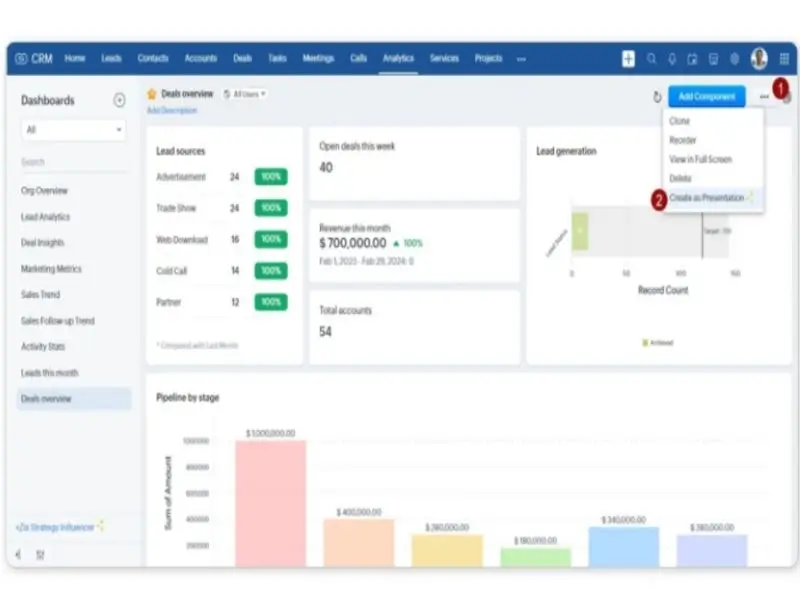
Zoho CRM is a cloud-based sales platform built by Zoho Corporation, a fully bootstrapped Indian tech company founded in 1996. They launched the CRM specifically in 2005. Over 250,000 businesses worldwide use it today.
Here’s what makes Zoho structurally different from competitors: they’ve never taken venture capital. No investor pressure means no forced price hikes or sudden pivots. That’s genuine stability for a multi-year software commitment.
Zoho CRM fits best for small and mid-sized businesses (1–200 users) that want enterprise-level features without enterprise-level prices. It’s also a natural fit for businesses already using Zoho Books, Zoho Desk, or Zoho Campaigns.
But it’s NOT for everyone. If you’re a non-technical founder with no admin support, setup will be painful. If you want AI features without paying $40/user/month, you’ll be disappointed. And if you want something to live in a day, look elsewhere.
For a broader comparison of CRM options for small teams, check out our guide on the best CRM software for small businesses.
Zoho CRM Pricing: Plans And Value Analysis
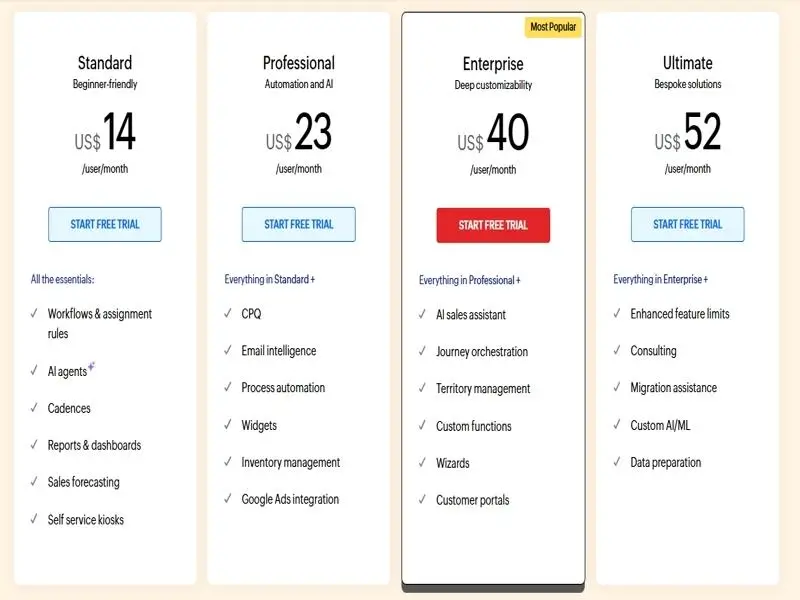
Source: zoho.com/crm/zohocrm-pricing.html — verified May 2026
Annual billing saves up to 34% compared to monthly billing. The Professional plan shows the biggest gap: $23/month annually vs. $35/month. Over 12 months for a 10-person team, that’s $1,440 saved.
Free Plan (Up To 3 Users)
The free plan is genuinely free, with no credit card. No expiry. You get leads, contacts, deals, basic reports, mobile access, and web-to-lead forms. Storage is 1GB for the whole org. Hard cap at 3 users.
It’s fine for testing the platform. But you get zero mass email, zero automation beyond basic rules, and zero custom modules. The moment you need automated follow-ups, you’ll hit the ceiling.
Best for: Founders evaluating Zoho before committing money.
Standard Plan ($14/User/Month)
Standard unlocks mass email (250 sends/user/day), multiple pipelines, custom dashboards, sales forecasting, workflow automation, and Zoho Marketplace integrations.
For 5 users: ~$70/month annually. For 10 users: ~$140/month annually.
Professional Plan ($23/User/Month)
Professional is where Zoho starts feeling like a serious sales tool. It adds Blueprint (visual process enforcement), SalesSignals (real-time lead alerts), inventory management with quotes and invoices, Google Ads integration, and webhooks.
For 5 users: ~$115/month annually. For 10 users: ~$230/month annually.
When I tested this with a simulated 7-person startup, Blueprint alone made Professional worth the upgrade. Any team managing multi-stage deals needs this.
Enterprise And Ultimate Tiers
Enterprise at $40/user/month is where Zoho’s most powerful features unlock — including Zia AI, territory management, custom modules (up to 200), advanced security, sandbox testing, and multi-user portals.
Ultimate at $52/user/month adds bundled Zoho Analytics, 2,000 daily emails, expanded storage, and priority support. It’s built for large, data-heavy teams that need serious reporting.
Hidden Costs And Add-Ons To Watch Out For
Here’s what most Zoho reviews don’t tell you. The sticker price is real — but it’s not the full picture.
- Premium Support (~20% of the license fee): Default Classic support provides 8×5 email access with a response time of up to 8 hours. If your CRM breaks on Friday evening, you wait until Monday.
- Implementation/migration: 40–120+ hours for SMBs. Zoho partners charge $500–$5,000+. Most buyers don’t budget for this.
- Add-ons from the official calculator: Extra file storage, extra data storage, weekly data backup, portal user licenses, expert-led training.
- Team Users (Enterprise+): Non-sales staff (marketing, support, finance) need a separate license tier to access CRM data.
Real Year-One Cost Reality: A 10-user team on Professional with Premium Support + basic add-ons + implementation could pay $4,000–$6,000 in year one — vs. the $2,760 sticker price. Factor this in before signing.
| Plan | Annual (per user/mo) | Monthly (per user/mo) | Best For |
|---|---|---|---|
| Free | $0 | $0 | Solo / 3-user max |
| Standard | $14 | $20 | Simple sales teams |
| Professional | $23 | $35 | Growing B2B teams |
| Enterprise | $40 | $50 | AI + customization |
| Ultimate | $52 | $65 | Data-heavy enterprises |
Core Features We Tested During Our 90-Day Trial
Contact Management And Lead Tracking
I imported 500 test contacts via CSV in under 10 minutes. Field mapping was intuitive. The system caught duplicates automatically and offered to merge them with a few clicks.
Each lead record shows a full timeline of every email, call, note, task, and activity. You never lose context on a relationship, even if three team members have touched that contact.
The web-to-lead forms are easy to set up. Website inquiry comes in it appears in CRM instantly. No Zapier needed. The Find & Merge Duplicates tool works across entire modules in bulk. Most CRMs make deduplication painful. Zoho makes it simple.
SalesSignals Knows The Exact Moment Your Lead Is Warm
SalesSignals sends real-time notifications every time a lead interacts with your brand. They open your email you see it. They visit your pricing page you see it. They open a chat, respond to a survey, and like a social post; all appear in your SalesSignals feed.
During testing, I had a lead visit our demo page. SalesSignals pinged me within seconds. I called within 2 minutes. Conversion rates on warm calls like that are dramatically higher than cold outreach.
Available from Professional plan ($23/user/month) and above. Works best with Zoho-native channels.
Sales Pipeline And Deal Management
The pipeline view is clean and customizable. Multiple pipelines from Standard upward. Each deal card shows stage, value, close date, and probability. Drag deals between stages.
I tested three simultaneous pipelines: inbound leads, outbound prospecting, and renewals. All handled without performance issues. One honest complaint: 200+ deals in board view get sluggish. Use list view for large volumes.
Blueprint — Enforce Your Sales Process
Blueprint is one of Zoho’s most powerful and most underrated features. Most CRMs let reps move deals through stages freely. Blueprint stops that.
You define the stages. You define what must happen before a deal can advance. You can require specific fields to be filled out, approvals to be obtained, or actions to be completed. A deal cannot move to ‘Negotiation’ unless a proposal document is attached and a decision-maker is logged. Period.
I built a 6-stage Blueprint for a simulated software sales process. Setup took about two hours. But once running, every record stayed clean and complete. No shortcuts.
Available from Professional ($23/user/month). Not on Standard.
Omnichannel Hub — Email, Calls, WhatsApp, Social In One Feed
Zoho CRM connects email, phone (50+ VoIP integrations), live chat, WhatsApp Business, WeChat, Facebook Messenger, and social media all inside one CRM. Every conversation is logged automatically against the right contact record.
The WhatsApp Business two-way integration is especially powerful. You send and receive WhatsApp messages directly inside CRM. Full history stored. Salesforce requires third-party apps for this. HubSpot locks WhatsApp behind higher tiers. Zoho has it baked in at the Professional plan.
The Zoho Ecosystem — 45+ Apps, One Login
Zoho doesn’t just make CRM. They make Zoho Books (accounting), Zoho Campaigns (email marketing), Zoho Desk (helpdesk), Zoho Projects, Zoho Analytics, Zoho Inventory, and 40+ more tools.
When connected, they talk natively. A deal closes in the CRM, and an invoice is automatically generated in Zoho Books. A support ticket in Zoho Desk appears in the CRM contact timeline. For an email marketing strategy alongside your CRM, see our guide on email marketing for small businesses.
Zoho One (all 50+ apps) starts at $37/user/month on the All Employee plan. That’s significantly cheaper than combining Salesforce, HubSpot, Zendesk, and Xero separately.
Workflow Automation Capabilities
Automation lets you trigger actions based on field changes, time conditions, or user actions. Auto-assign leads, send follow-up emails, create tasks, update fields, call webhooks.
Standard gives 10 workflow rules per module. A professional adds conditional-logic workflows that branch based on criteria. Building complex multi-step workflows takes time. The UI is functional but not as visual as HubSpot’s Workflows builder. Worth knowing before you start.
Canvas — Redesign Your CRM Without Writing Code
Canvas is a drag-and-drop interface builder that lets you completely redesign how CRM record pages look, with custom layouts, field positions, colors, and data visibility without writing code.
A real estate agency can put ‘listing price’ and ‘showing history’ at the top of every lead record. A legal firm can prioritize ‘case type’ and ‘jurisdiction.’ I redesigned a test record layout in 45 minutes.
Limitation: When your data model changes, Canvas layouts need manual updating and small ongoing maintenance overhead.
Zia AI is powerful, But Only If You Pay For Enterprise
Zia is all over Zoho’s website. And it’s genuinely impressive: it predicts deal win probabilities, scores leads, detects anomalies in sales data, suggests the best contact time, analyzes email sentiment, and flags churn risk.
But this is critical: Zia is only available on Enterprise ($40/user/month) and Ultimate. Standard and Professional users get no Zia. Zero.
Also, Zia needs at least 75 converted leads in your CRM history to build its initial prediction model. New businesses won’t benefit from predictive scoring right away.
Q1 2026 update: Smart Prompts 2.0 now supports third-party LLMs (ChatGPT, Claude) alongside Zia. You can generate AI-powered email drafts, record summaries, and notes inside any CRM record, choosing your preferred AI model. That flexibility is rare at this price point.
Analytics And Reporting Tools
Standard reports are included from the Standard plan. More customizable dashboards come with Professional. Full Zoho Analytics integration is bundled with Ultimate.
The Anomaly Detector flags unusual patterns automatically, including spikes in lost deals and drops in response rates, without you having to dig. On Enterprise, a unique ‘butterfly chart’ visualization compares two datasets side by side. I haven’t seen that in other SMB CRMs.
Honest frustration: building complex custom reports requires experience. Not always intuitive. If serious BI is your goal, budget for Ultimate with Zoho Analytics included.
Mobile App, API Access, and GDPR Compliance
The mobile app supports offline mode: log activities, update records, and add notes without an internet connection; syncs when you reconnect. The 2025 UI redesign made navigation significantly cleaner.
RouteIQ plans the most efficient driving route to visit multiple leads in a day. Perfect for outside sales teams. Business card scanning via camera creates contact records in seconds.
The REST API is robust. Developers can build custom integrations, pull data, push updates, and automate workflows between Zoho and any system, including Pipedrive.
GDPR: Built-in data portability, right-to-erasure workflows, consent tracking, and audit trails. Zoho publicly pledges that it does not sell user data and does not run an advertising business model. Rare in SaaS.
What’s New In 2026? Zoho CRM Latest Updates
Workqueue — Brand New In Q1 2026
Before Workqueue, sales reps jumped between multiple modules every day, leads here, tasks there, deals somewhere else. Constant navigation friction.
Workqueue fixes this. It’s a centralized, prioritized view that pulls everything requiring a rep’s attention into a single, unified dashboard. High-priority deals. Open tasks. New leads. Scheduled calls. All in one place.
I tested this in late Q1 2026. It genuinely speeds up daily workflow. Small change, big practical difference. And it directly addresses the #1 usability complaint about Zoho CRM.
Other Recent Updates Worth Knowing
- Zia Formula Expression Generator: Describe the formula you need in plain English. Zia writes the technical expression for your real quality-of-life improvement for CRM admins.
- Smart Prompts 2.0: Supports third-party LLMs (ChatGPT, Claude) alongside Zia. Access AI assistance inside any CRM record to draft emails, summarize conversations, and update notes.
- CPQ Enhancement: More precise pricing rule triggers based on product quantities and discount thresholds. Significant for complex quoting workflows.
- Zia Purchase Pattern Detection: Analyzes historical quote data to surface frequently purchased product combinations and auto-suggests bundle pricing rules.
Zoho CRM Pros And Cons: Our Honest Experience
Key Advantages (Customization & Integrations)
- Best price-to-feature ratio in the SMB CRM market: Enterprise at $40/user/month includes AI, territory management, and custom modules that cost $100+/user on Salesforce.
- Zoho ecosystem advantage: Native integration across 45+ Zoho apps saves hundreds of dollars per month in middleware costs compared to multi-vendor setups.
- Blueprint is industry-leading: No other CRM under $50/user enforces sales process compliance this robustly.
- WhatsApp Business integration: Two-way messaging baked in at Professional — best-in-class for markets where WhatsApp is primary.
- Privacy and stability: Bootstrapped, no VC pressure, doesn’t sell user data. Rare long-term reliability in SaaS.
Notable Drawbacks (Complexity & Learning Curve)
- Steep learning curve: Basic use takes a few days. Blueprints, custom functions, territory rules, and advanced integrations often take weeks and require a paid Zoho partner.
- Zia AI is gated at Enterprise: Zoho markets AI prominently but restricts it to $40/user/month. Standard and Professional buyers get no AI at all.
- 10 workflow rules/module on Standard: A real ceiling. Most businesses with any sales complexity hit it fast and feel pushed to upgrade.
- Weekend performance issues: Multiple verified Gartner Peer Insights reviewers (March 2026) report CRM slowdowns on weekends. Documented operational risk for businesses with Saturday/Sunday peak hours.
Customer Support Quality And Response Times
This is a real weakness. Classic Support (included with all paid plans) means business-hours email with responses within 8 hours. CRM breaks on Friday evening? You wait until Monday.
Premium Support (24/5, 3-hour response) costs ~20% of your total license fee. Enterprise Support (24/7, 1-hour response) requires a minimum of 50 user licenses. Small teams can’t access it at all.
My honest take: if your business is operationally dependent on Zoho CRM, budget for Premium Support from day one. Don’t learn this the hard way.
Real-World Use Cases: Who Gets the Most Value
Freelancer / Solopreneur
Setup: Free plan, 1 user. A freelance B2B consultant tracks 40 active prospects. Web-to-lead forms capture inquiries automatically. Every prospect has logged emails, call notes, and tasks. The consultant checks the pipeline each morning and never misses a follow-up.
Result: Works genuinely well. Zero cost, real value. But the moment you want automated follow-up sequences, you’ve outgrown free. Standard costs $168/year for 1 user, and is often worth it.
7-Person SaaS Startup
Setup: Professional ($23/user/month) → $1,932/year. The team built a 5-stage Blueprint enforcing their qualification process. No deal advances to demo without a discovery call logged. SalesSignals alerts reps when trial users visit the pricing page.
Reality check: Zia AI is not available on the Professional plan. Manual lead scoring only. They also paid ~$1,500 for a Zoho partner for initial setup. Actual year-one cost: closer to $3,400. Still far cheaper than equivalent HubSpot or Salesforce configurations.
Digital Marketing Agency (12 People)
Setup: Zoho CRM Plus ($57/user/month) bundling CRM, Campaigns, Desk, Social, Analytics, SalesIQ, and Projects.
The agency manages 60+ active client accounts. Campaign performance from Zoho Campaigns links to client records. Support tickets from Zoho Desk appear in the CRM contact timeline. Account managers see the full client history, sales, support, and campaign results in one place.
Annual cost for 12 users on CRM Plus: ~$8,208/year. Compared to HubSpot Marketing Hub + Zendesk + separate analytics? A meaningful saving. To compare your email marketing options, see our email marketing software guide.
Manufacturing / Distribution Business
Setup: Enterprise ($40/user/month) + Zoho Inventory. A 25-person wholesale distributor connects CRM and Inventory natively. Sales reps check real-time stock levels inside CRM deal records before quoting. When a deal closes, an invoice is automatically generated in Zoho Books.
Verified Gartner results (March 2026): 23% improvement in lead conversion rate, 37% reduction in distributor response time, 19% improvement in production forecast accuracy. This is where the Zoho ecosystem delivers its strongest measurable ROI.
Zoho CRM vs Alternatives
| CRM | Starting Price | Best For | Beats Zoho On | Zoho Beats It On |
|---|---|---|---|---|
| HubSpot CRM | Free / $20/seat | Inbound + marketing | UI simplicity, onboarding | Price at scale, WhatsApp |
| Pipedrive | $14/user/mo | Visual pipeline, SMBs | Ease of use, speed | Automation depth, ecosystem |
| Freshsales | Free / $9/user/mo | Call-heavy teams | Built-in phone, ratings | Customization, integrations |
| Salesforce | $25/user/mo | Large enterprises | AppExchange, Einstein AI | Price, SMB accessibility |
HubSpot CRM
HubSpot’s free plan offers unlimited users (Zoho caps at 3). The interface is significantly cleaner. But Sales Hub Professional starts at $890/month for 5 seats. Zoho Enterprise for 5 users: $200/month. That’s $8,000+/year in savings for broadly comparable features.
Choose HubSpot if marketing and sales alignment is your priority and budget isn’t a constraint. See our full HubSpot CRM review for a detailed comparison.
Pipedrive
Pipedrive does one thing brilliantly: visual pipeline management. The drag-and-drop Kanban board is the best in the market. Non-technical reps figure it out in hours, not weeks. Starts at $14/seat/month (Essential, annual).
Choose Pipedrive if you want the fastest time-to-value, and your team needs something simple they’ll actually use. But if you need deeper automation or ecosystem integration, Zoho wins. For more alternatives, read our Pipedrive alternatives guide.
Freshsales (By Freshworks)
Freshsales holds the highest combined rating in the SMB CRM market, 4.5/5 on both G2 and Capterra. They include a built-in cloud phone system on every plan, including the free tier. Zoho requires a separate VoIP provider for calling.
Choose Freshsales if your team makes a lot of outbound calls and you want calling built in, without add-ons, starting at $9/user/month for Growth.
Salesforce Sales Cloud
Salesforce has the largest AppExchange ecosystem, and its Einstein AI is available at lower tiers than Zoho’s Zia. But comparable features cost 2–3x more. Enterprise Salesforce starts at $165/user/month.
Choose Salesforce if you’re a 500+ employee org with dedicated admins. Choose Zoho if you want 80% of Salesforce’s functionality at 25–40% of the price.
Frequently Asked Questions About Zoho CRM
Final Verdict: Should You Use Zoho CRM?
After 90 days of real-world testing, Zoho CRM is one of the best-value CRM platforms in 2026. Full stop. The feature depth at Enterprise genuinely competes with tools costing 2–3x more.
But it’s not as simple as the marketing makes it look.
| ✅ Use Zoho CRM If… | ❌ Avoid Zoho CRM If… |
|---|---|
| You’re building on the Zoho ecosystem (Books, Desk, Campaigns, Inventory). | You’re a non-technical founder who can’t support a real implementation process. |
| You have a dedicated admin or can afford a Zoho partner. | You want AI features, but you only have a budget for Standard or Professional. |
| You need Blueprint-style process enforcement at SMB pricing. | Your business peaks on weekends (documented performance degradation). |
| You operate in a WhatsApp-primary market. | You need reliable 24/7 support included in your base price. |
| Cost is your primary constraint vs. HubSpot or Salesforce. | You want the easiest, fastest CRM deployment possible. |